> ## Documentation Index
> Fetch the complete documentation index at: https://docs.racedayready.app/llms.txt
> Use this file to discover all available pages before exploring further.
# How it works
> A quick guide to getting started with RaceDayReady
## What is RaceDayReady?
RaceDayReady is an AI-powered endurance training platform that helps you plan, build, and manage your training plan from signup to race day. Whether you're training for a triathlon, marathon, century ride, or pool swim, RaceDayReady helps you get there.
1. **You're in control** - build workouts with our AI workout builder or accept curated suggestions tailored to your goals and recent performance.
2. **Syncs with your training apps** - Strava and Garmin activities sync automatically, no manual logging needed.
3. **Track your progress** - curated advice and suggestions toward your upcoming races and goals.
## How RaceDayReady suggests workouts
RaceDayReady uses a combination of algorithmic training based on short and long term training load, combined with fine-tuned LLMs to suggest workouts tailored to your goals and recent performance.
We've generated thousands of workouts and refined our AI to suggest the best workouts for you.
### Add a workout to add it to your plan
**RDR operates with you in control**. RDR will suggest curated workouts based on your recent activity and upcoming races, but you are at the wheel controlling your plan. You can accept the suggestions as-is, modify them, or create your own workouts from scratch.
## Getting started
Create an account with your email or sign in with Strava. If you use Strava, your account connects automatically and activities start syncing right away.
## Your dashboard
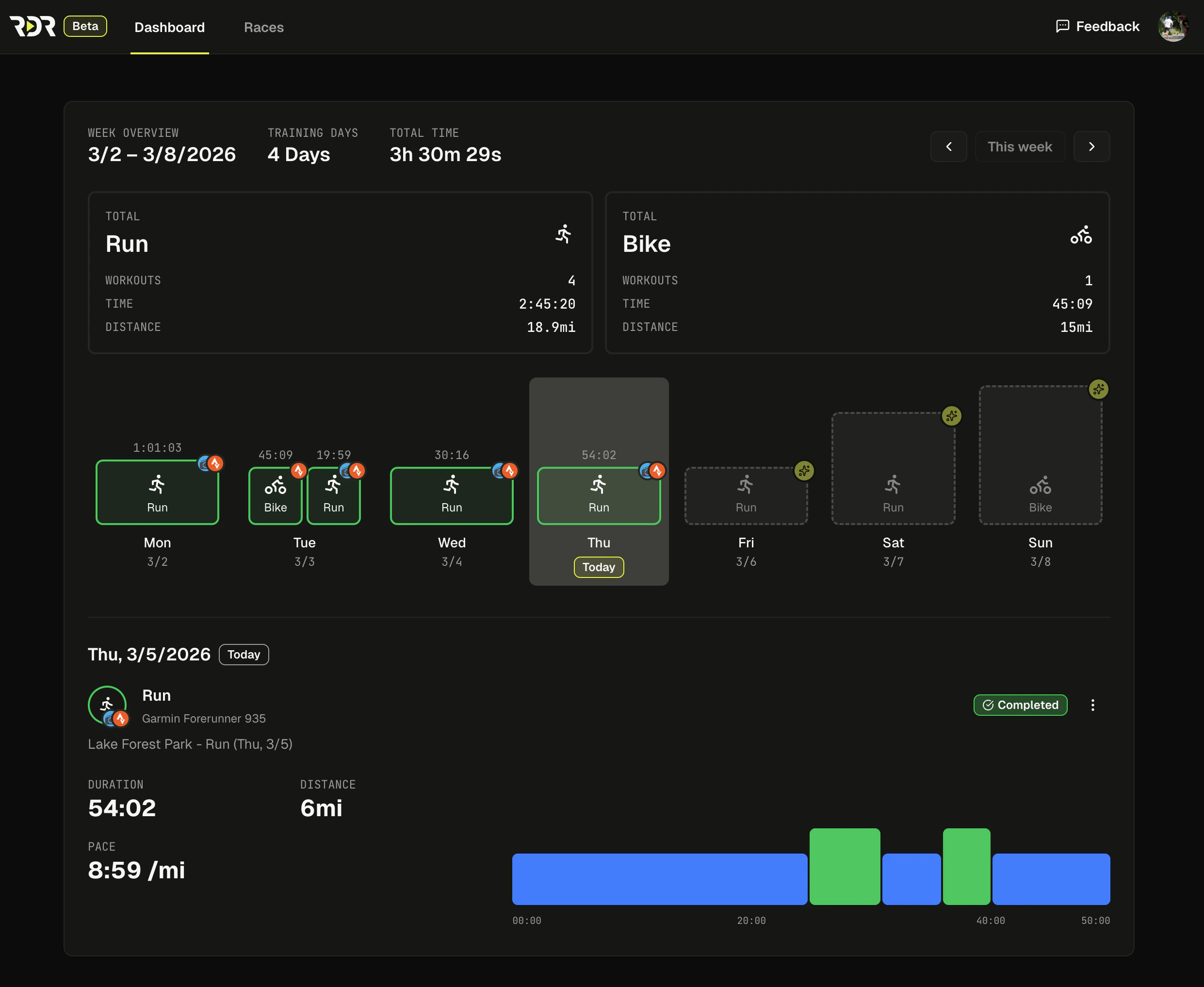
The dashboard shows your training week at a glance. Navigate between weeks, click any day to view or create workouts, and track workout status — **planned**, **completed**, or **missed**.
 ***
## Building workouts
### AI workout builder
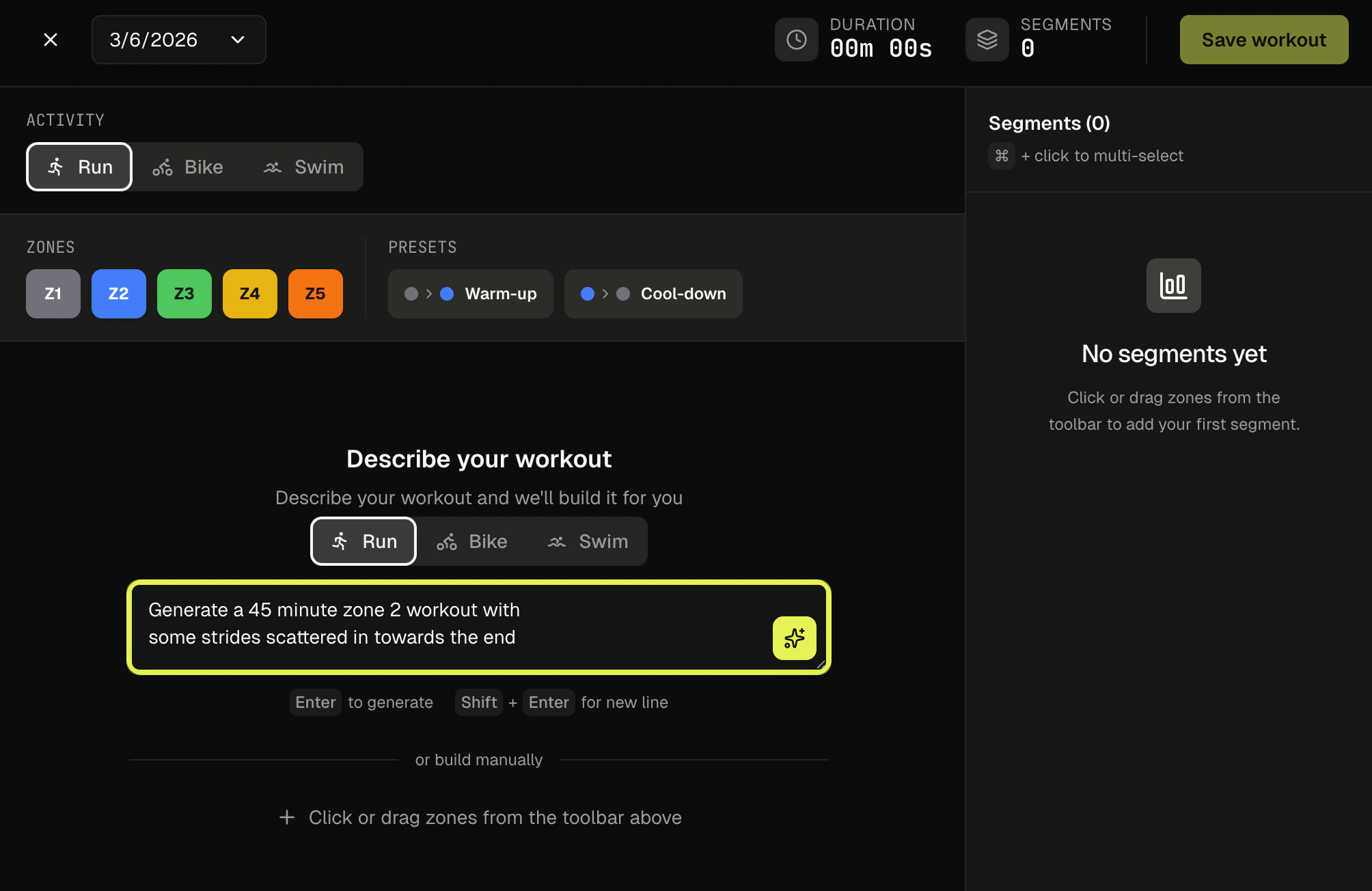
Describe what you want in plain language and our AI generates a structured workout with segments, durations, and intensity zones. For example:
* "60-minute easy zone 2 run"
* "Bike intervals, 5 min hard / 3 min easy, repeat 4x"
* "30-minute recovery swim"
Review, edit, and save when you're happy.
***
## Building workouts
### AI workout builder
Describe what you want in plain language and our AI generates a structured workout with segments, durations, and intensity zones. For example:
* "60-minute easy zone 2 run"
* "Bike intervals, 5 min hard / 3 min easy, repeat 4x"
* "30-minute recovery swim"
Review, edit, and save when you're happy.
 ### Weekly suggestions
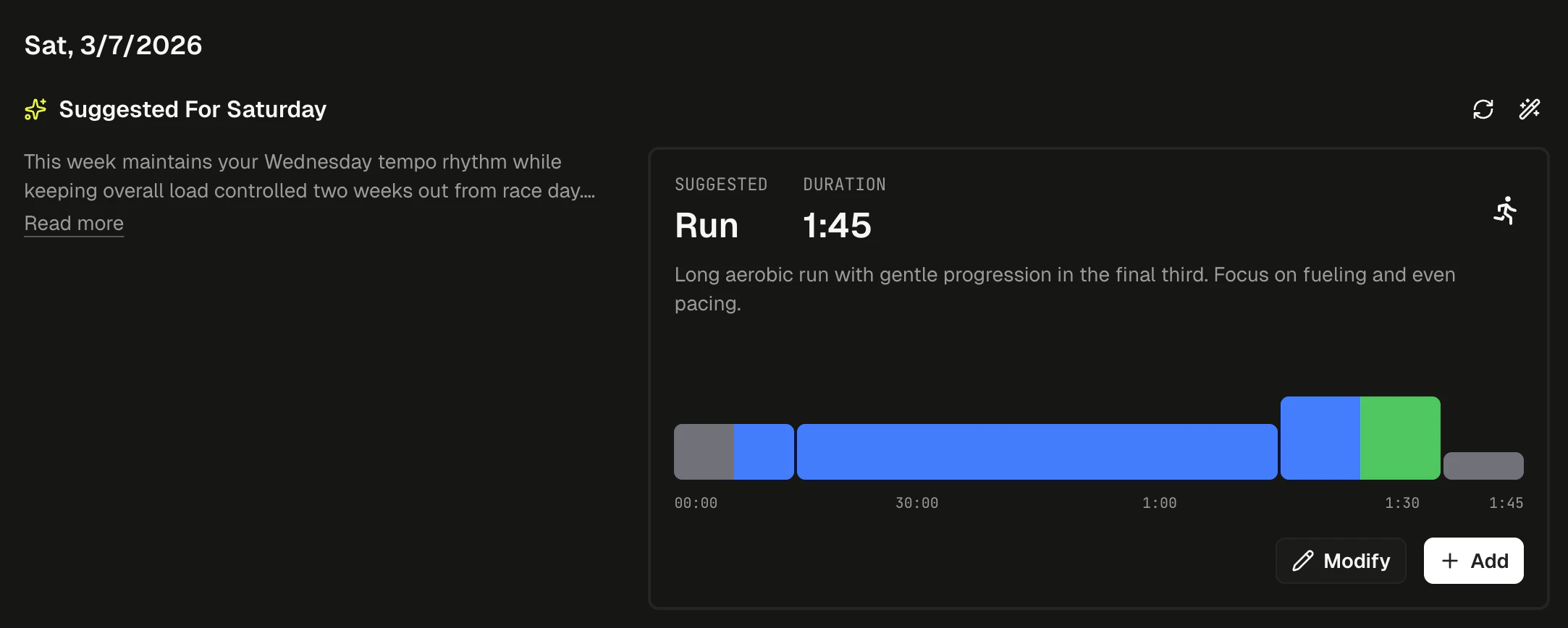
Each week, RaceDayReady generates personalized workout suggestions based on your recent activity, upcoming races, and training load. Accept them as-is, modify them, or ignore them — they refresh every week.
### Weekly suggestions
Each week, RaceDayReady generates personalized workout suggestions based on your recent activity, upcoming races, and training load. Accept them as-is, modify them, or ignore them — they refresh every week.
 ### Manual builder
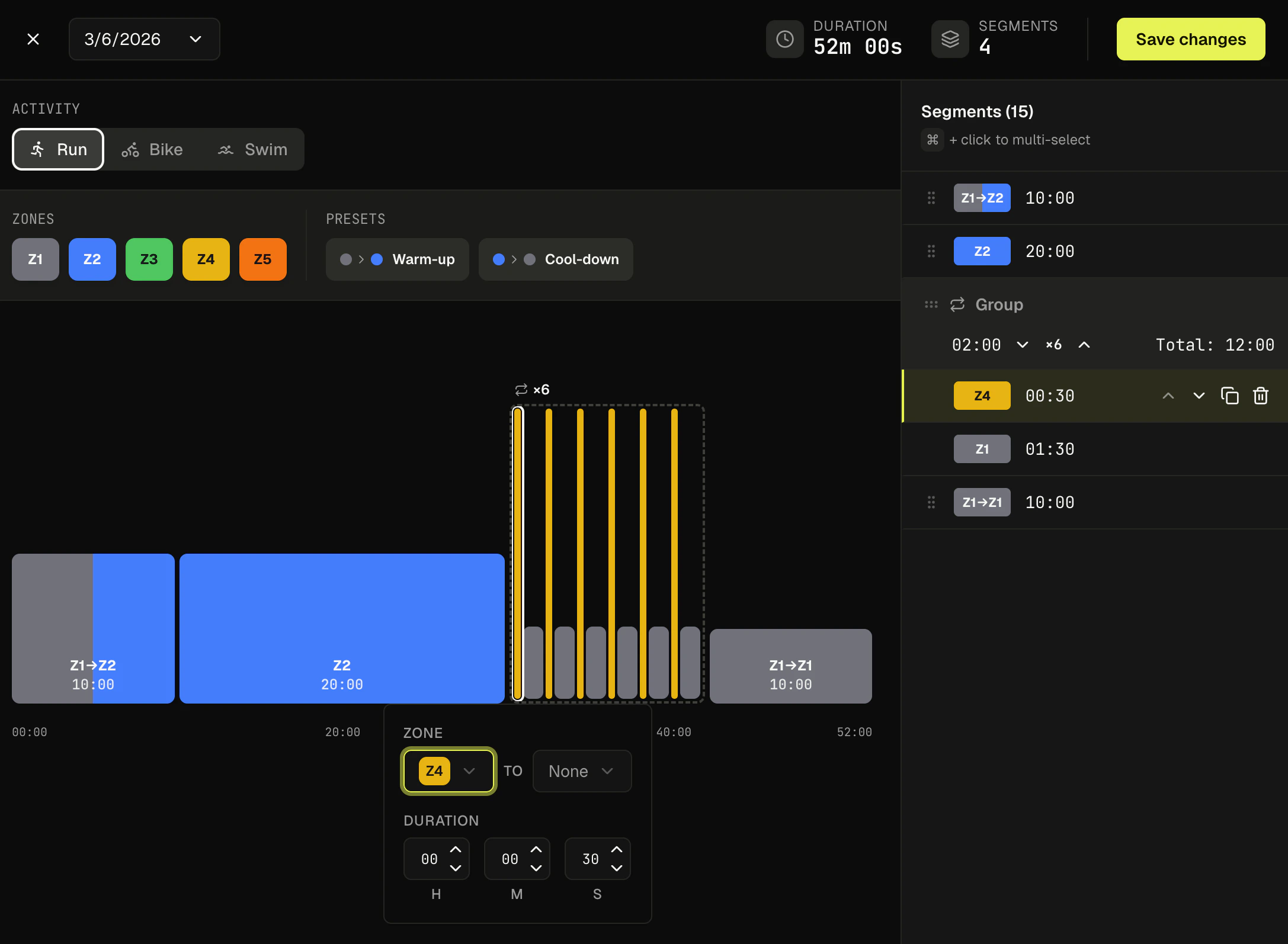
Build workouts segment by segment with full control over duration and intensity zones. Workouts auto-save as drafts so you won't lose progress.
### Manual builder
Build workouts segment by segment with full control over duration and intensity zones. Workouts auto-save as drafts so you won't lose progress.
 ***
## Race planning
Adding a race gives RaceDayReady the context to tailor your weekly suggestions and track progress. Set your race name, date, type, and per-segment details (distance, elevation, target time).
Browse the **race catalog** to quickly add well-known races with pre-populated distances and cutoff times. Your personal target time is always separate from the official cutoff, you can update it anytime.
***
## Integrations
Have an integration you'd like to see? Let us know!
### Strava
Two-way sync - completed Strava activities automatically appear in RaceDayReady and get matched to planned workouts. Optionally append "Trained with RaceDayReady" to activity descriptions.
See the [Sync with Strava](/guides/strava) guide for details.
### Garmin
Saved workouts automatically sync to Garmin Connect and transfer to your device at next sync. No manual export needed. You can also import historical data when first connecting.
See the [Export to Garmin](/guides/garmin) guide for details.
### Zwift
Export any cycling workout as a `.zwo` file and load it into Zwift manually. See the [Export to Zwift](/guides/zwift) guide for details.
***
## Typical week using RaceDayReady
Check out your AI-generated workout suggestions at the start of each week. You'll get an email when new suggestions are available.
Accept suggestions, modify them, or create your own.
Do your workouts and record them with Strava or Garmin as usual.
Completed activities sync automatically and match to your planned workouts.
Next week, fresh suggestions are waiting based on your recent activity and upcoming races. Your training will continue to adapt as you go.
Last updated: March 5, 2026
***
## Race planning
Adding a race gives RaceDayReady the context to tailor your weekly suggestions and track progress. Set your race name, date, type, and per-segment details (distance, elevation, target time).
Browse the **race catalog** to quickly add well-known races with pre-populated distances and cutoff times. Your personal target time is always separate from the official cutoff, you can update it anytime.
***
## Integrations
Have an integration you'd like to see? Let us know!
### Strava
Two-way sync - completed Strava activities automatically appear in RaceDayReady and get matched to planned workouts. Optionally append "Trained with RaceDayReady" to activity descriptions.
See the [Sync with Strava](/guides/strava) guide for details.
### Garmin
Saved workouts automatically sync to Garmin Connect and transfer to your device at next sync. No manual export needed. You can also import historical data when first connecting.
See the [Export to Garmin](/guides/garmin) guide for details.
### Zwift
Export any cycling workout as a `.zwo` file and load it into Zwift manually. See the [Export to Zwift](/guides/zwift) guide for details.
***
## Typical week using RaceDayReady
Check out your AI-generated workout suggestions at the start of each week. You'll get an email when new suggestions are available.
Accept suggestions, modify them, or create your own.
Do your workouts and record them with Strava or Garmin as usual.
Completed activities sync automatically and match to your planned workouts.
Next week, fresh suggestions are waiting based on your recent activity and upcoming races. Your training will continue to adapt as you go.
Last updated: March 5, 2026